MARS tickets
The MARS tickets page offers a single view of all your MARS tickets and gives you the ability to filter them by date, destination, shipment status, reference, severity, and more.
Note
This tab is only visible to customers using the MARS service.
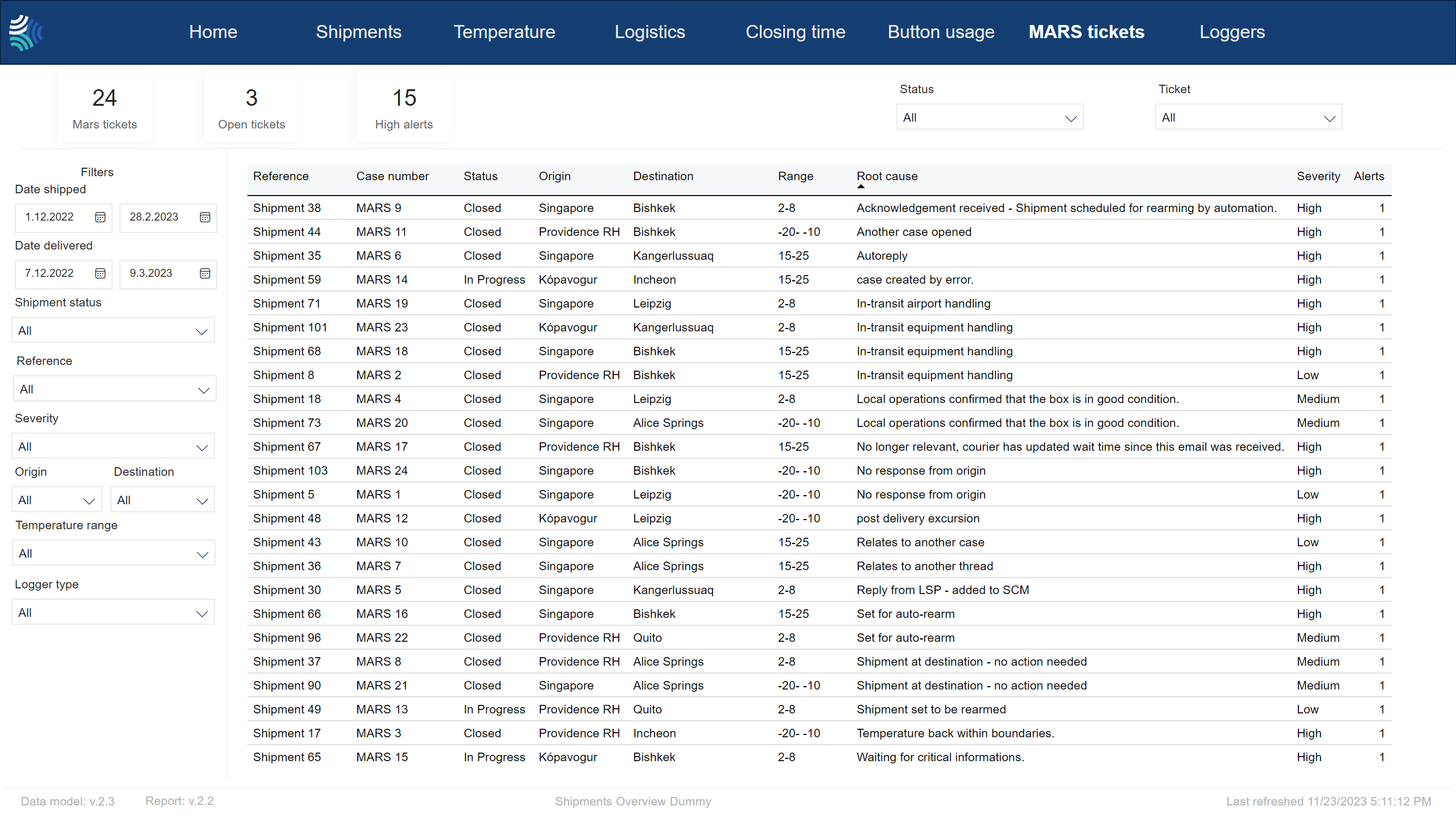
MARS tickets KPIs

Key performance indicators for selected MARS tickets.
Item | Description |
|---|---|
Mars tickets | Number of MARS tickets. |
Open tickets | Number of tickets in open state. |
Closed without root cause | Number of Closed shipments without root cause |
Note
Not all customers have the same filters. You may not see all of the following filters, and you may have filters not included below.
Tip
For any filter, to clear it, click  .
.
You can use the filter to select shipments data to include in the report using the following criteria:
Item | Description |
|---|---|
Date shipped | Date range for the date shipment was started, in Type a date, or click
|
Date delivered | Date range for the date shipment was delivered, in Type a date, or click
|
Reference | Reference to unique identifier of shipment in customer's system. Click to select, or press CTRL and click to select more than one from the list. |
Severity | Severity of excursion. Click to select, or press CTRL and click to select more than one of the following: |
Status | Current status of shipment. Click to select, or press CTRL and click to select more than one of the following: |
Origin | Origin of shipment. Click to select, or press CTRL and click to select more than one from the list. |
Destination | Destination of shipment. Click to select, or press CTRL and click to select more than one from the list. |
Temperature range/ Stowage condition | Temperature range to filter for. Click to select, or press CTRL and click to select more than one from the list. |
Transportation mode | Transportation mode. Click to select, or press CTRL and click to select more than one from the list. Options include:
|
Carrier | Name of carrier. |
Logger type | Type of device. Click to select, or press CTRL and click to select more than one from the list. |


Filters to select a subset of MARS tickets.
Item | Description |
|---|---|
Ticket | Select one or more tickets. To select a single ticket, click the ticket. To select multiple tickets, press CTRL and click the tickets. |
Status | The options displayed in the Status filter for MARS tickets will only include the statuses that are currently present in the report. However, the full list of possible statuses is:
To select a single status, click the status. To select multiple statuses, press CTRL and click the statuses. |
Alert severity | Select one or more alert severities from the following options:
|
Root cause status | Select one or more root cause addded by the MARS team.
|
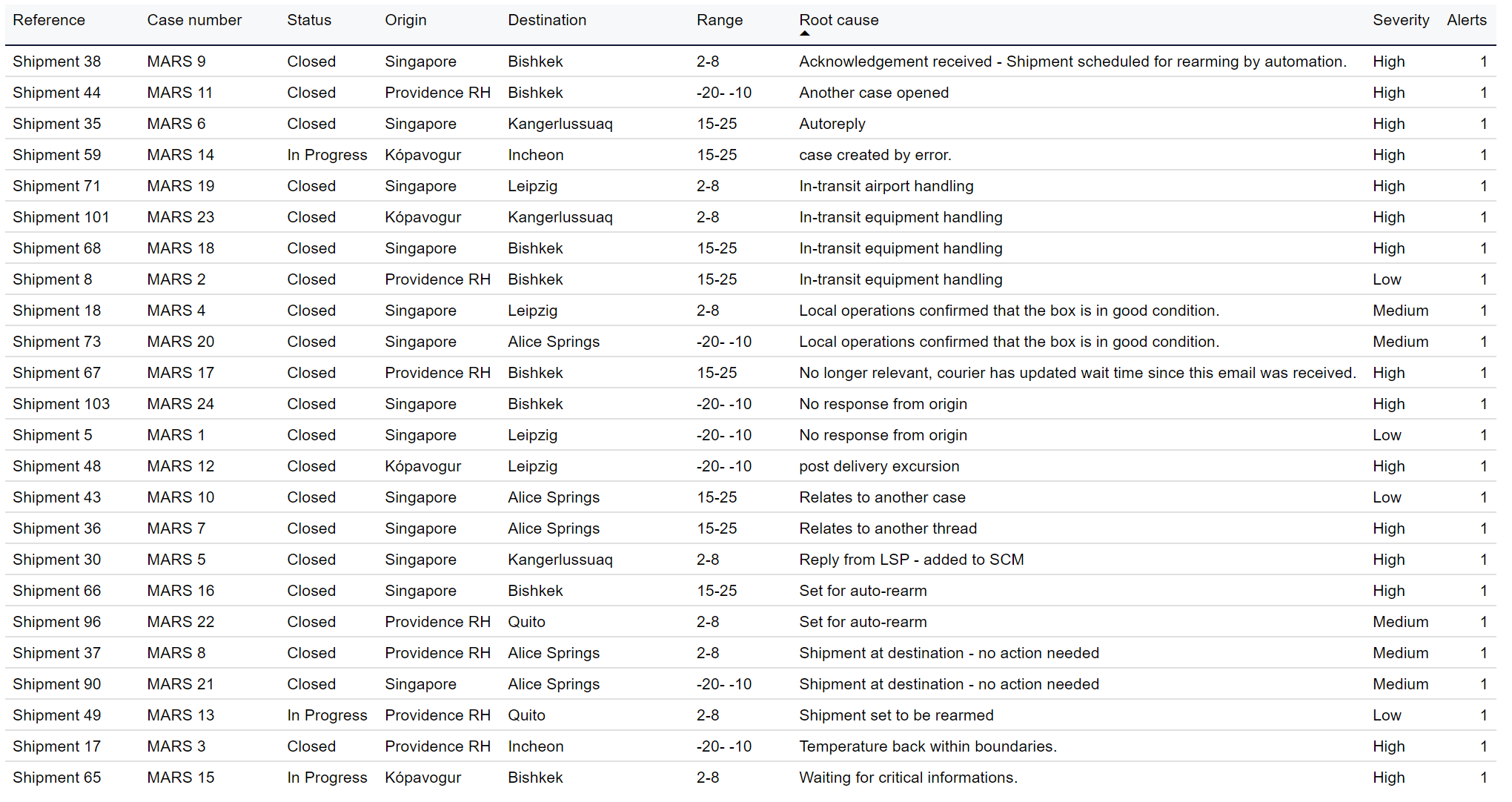
Table showing selected MARS tickets.
Tip
You can configure which columns to show in the Table columns drop-down. The default columns are indicated in bold below.
Ctrl-click to select multiple.
Item | Description |
|---|---|
Reference | Reference to unique identifier of shipment in customer's system. |
Status | Status of ticket:
|
Origin | Origin location of shipment. |
Destination | Destination location of shipment. |
Range | Temperature range configured for the shipment. |
Carrier | Name of carrier, as configured in custom properties in Supply Chain Monitoring. |
Transportation mode | Transportation mode used for the shipment. |
Root cause | Root cause of issue ticket was created for, added by MARS team. |
Case severity | Severity of excursion ticket was created for. |
Shipment id | Unique identifier of shipment. |
Ticket | Case number / ticket id. |
Shipped | Date shipment was shipped, in Blank if shipment has not been delivered. |
Delivered | Date shipment was delivered, in Blank if shipment has not been delivered. |
Origin country | Origin country of shipment, in 2-letter ISO code format. |
Destination country | Destination country of shipment, in 2-letter ISO code format. |
Response time | Time between ticket creation and the first response to the ticket. |
SCM | Link to shipment in Controlant Platform (SCM). |
Number of alerts | Number of alerts logged for the shipment linked to the ticket. |